For care agencies in Switzerland

The weekly plan that checks the GAV itself

Weekly and four-week planning, time recording and the complete Visierung chain in one system. Eleven checks run before a plan is approved.

30 minutes, no risk, you see the real system
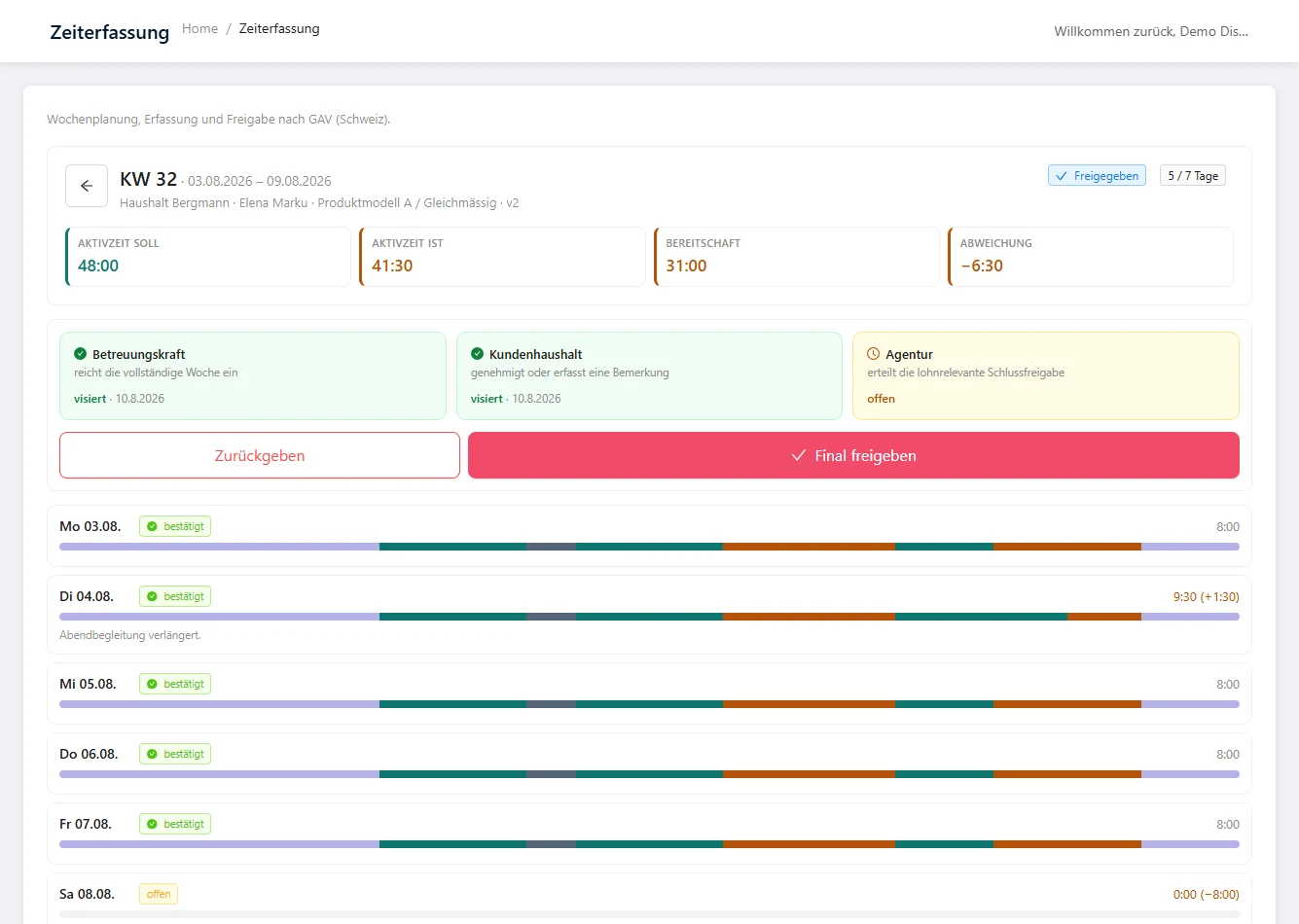
Weekly plan in the GAV module: calendar week with planned and actual active time, standby, deviation, Visierung chain and the daily bars of the week
Since 1 December 2025

Visierung cannot be rebuilt in Excel

Under the new special provisions for live-in care (Art. 17a to 17e ArGV 2, the Swiss Ordinance 2 to the Employment Act), working hours and call-outs must be documented and signed off by everyone involved. Caregiver, client household and agency, every week, traceable and versioned. If you run this in spreadsheets and email chains, you have no reliable basis for the payroll run at the end of the month.

“Working hours and call-outs must be documented and signed off by everyone involved.”
Special provisions for care in private households, Ordinance 2 to the Employment Act (ArGV 2, SR 822.112), Art. 17a–17e, in force since 01/12/2025 (translated from German)

Legal basis in full: Ordinance 2 to the Employment Act (ArGV 2), SR 822.112, Art. 17a to 17e — officially published in the Classified Compilation of Federal Legislation (Fedlex); the competent authority is the State Secretariat for Economic Affairs SECO. HerzensManagement covers the documentation and Visierung steps; it does not replace a legal assessment of your individual case.

Not a foreign tool bent into shape

Built for the Swiss market, not translated

GAV weekly planning (GAV: the Swiss collective labour agreement) is a separate module that is only activated for Swiss agencies. Austrian agencies see neither the menu item nor the data fields. Terms, rounding and rules stay cleanly separated instead of ending up in a shared form in which half of it does not fit any given market.

Planning

Your models, your variants, no release needed

The product models are stored as master data in your agency, not in our code. You define how much active time and standby a week contains and which rest periods are guaranteed. You can create a new model or adjust hour values yourself, without waiting for a software release.

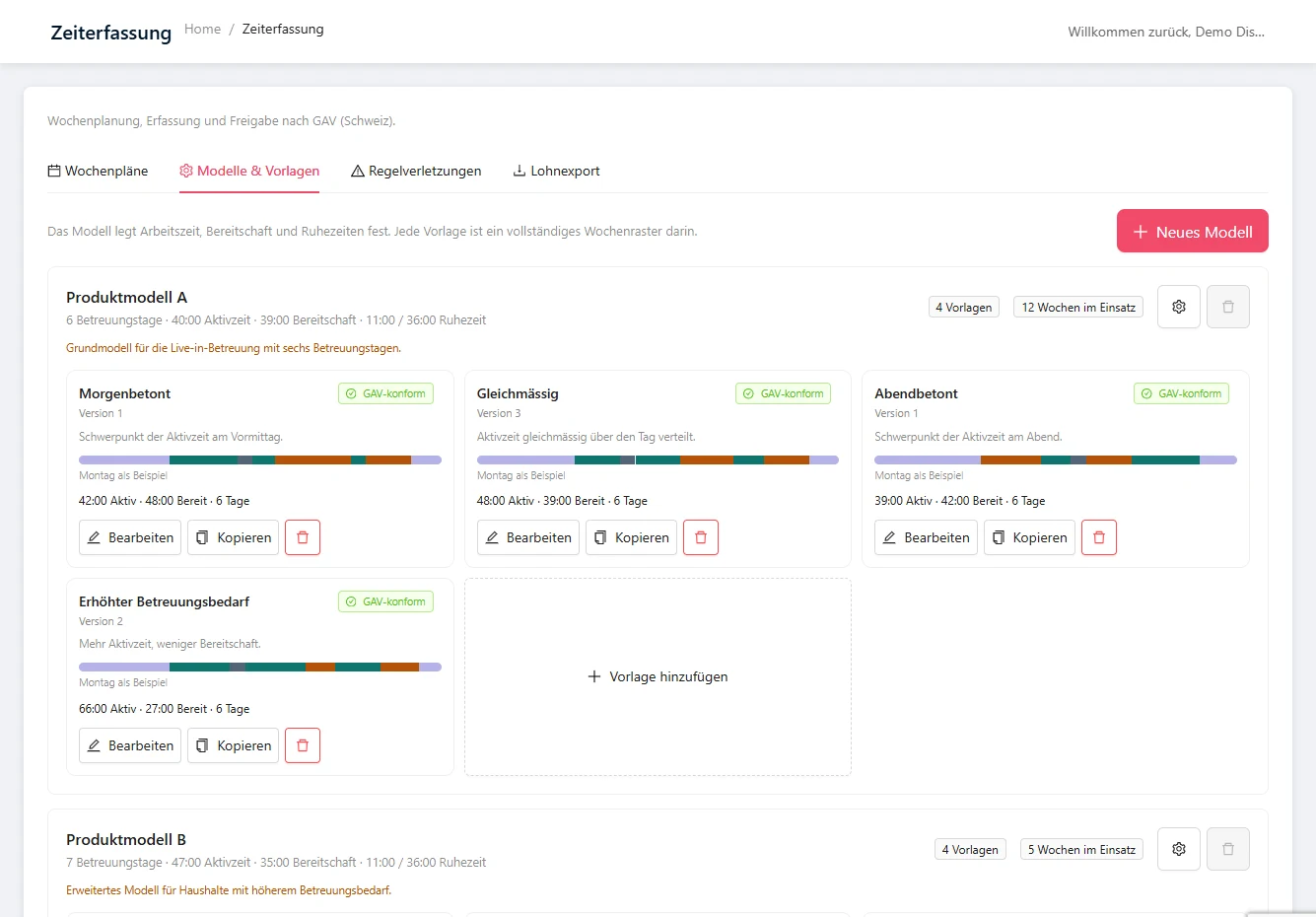
For each model you store at least four weekly templates, for example morning-weighted, evenly spread, evening-weighted and increased care needs. Each template is a complete seven-day grid of blocks for active time, standby, break, free time and rest period. Templates can be copied, adapted to a client and versioned.

Models and weekly templates in the GAV module: two product models with four templates each, every one marked as GAV-compliant
Rule checks

Eleven rules run alongside, on three levels

Every plan is checked against daily, weekly and four-week rules: maximum working time, standby days in the rolling four-week window, standby per day and how it is split, night-time call-outs, daily break, additional break after night duty, daily and weekly rest period, intervention time and availability in the household.

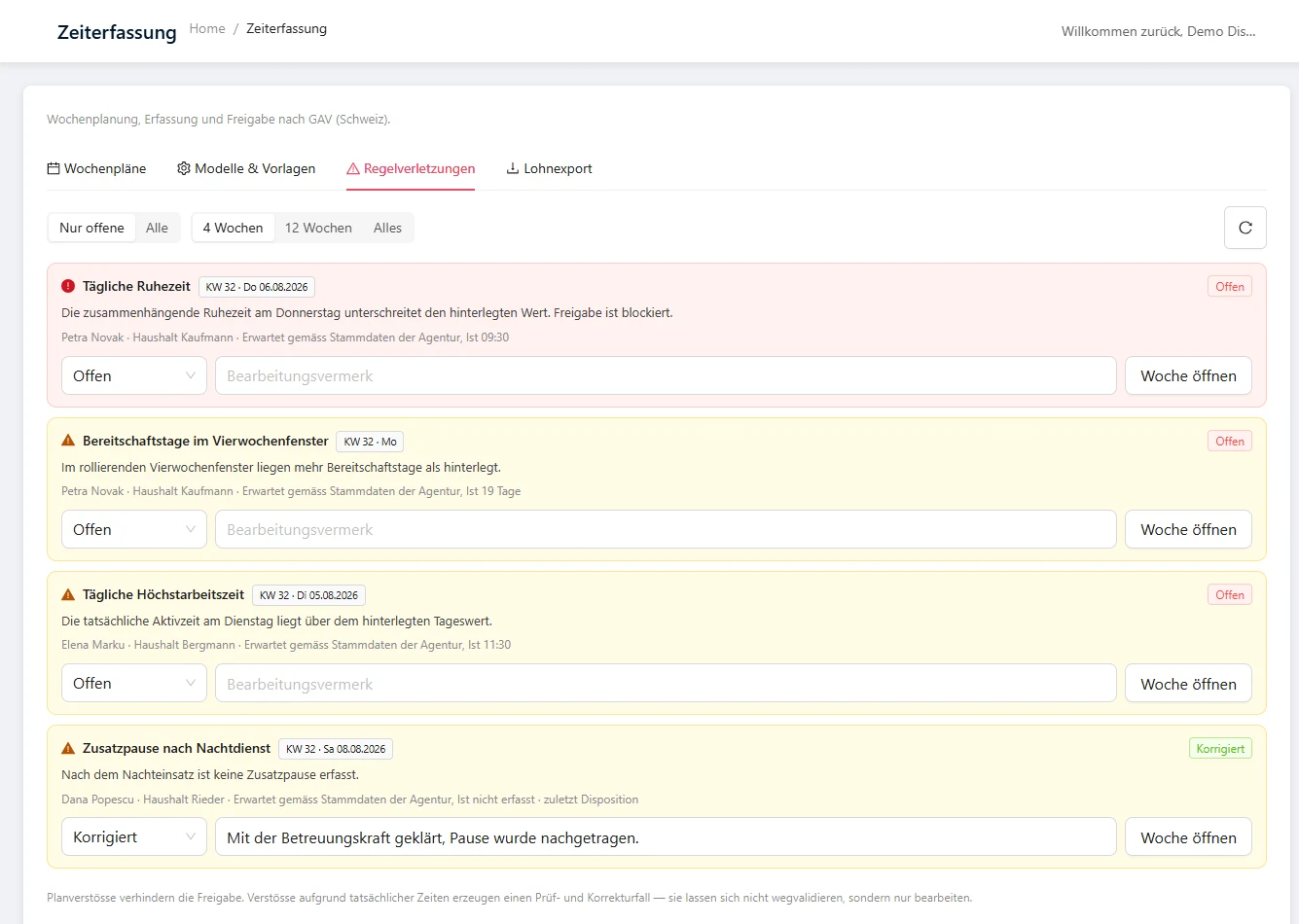
Violations in the plan block approval. Violations arising from the actual times block nothing, because you cannot validate away the past; instead they create a review and correction case in the back office.

Rule set · 11 checks on three levels Day Week 4 weeks
RuleLevelEffect in the plan
1. Maximum working timeDay · WeekBlocks approval
2. Standby days in the rolling four-week window4 weeksBlocks approval
3. Standby per dayDayBlocks approval
4. Split of standbyDayBlocks approval
5. Night-time call-outsDayBlocks approval
6. Daily breakDayBlocks approval
7. Additional break after night dutyDayBlocks approval
8. Daily rest periodDayBlocks approval
9. Weekly rest periodWeekBlocks approval
10. Intervention timeDayBlocks approval
11. Availability in the householdWeekBlocks approval

Diagram. Arising from the actual times, the same violation blocks nothing but creates a review and correction case in the back office. The stored limits are your agency's master data and are deliberately not shown on this page.

Rule violations in the GAV module: four alerts with rule, affected day, expected and actual value, and processing status
Recording

A standard day in one click, a deviation in ten seconds

The approved plan is already in the caregiver's day view in the morning. If the day went as planned, they confirm all time blocks with one click, and the daily totals are fixed.

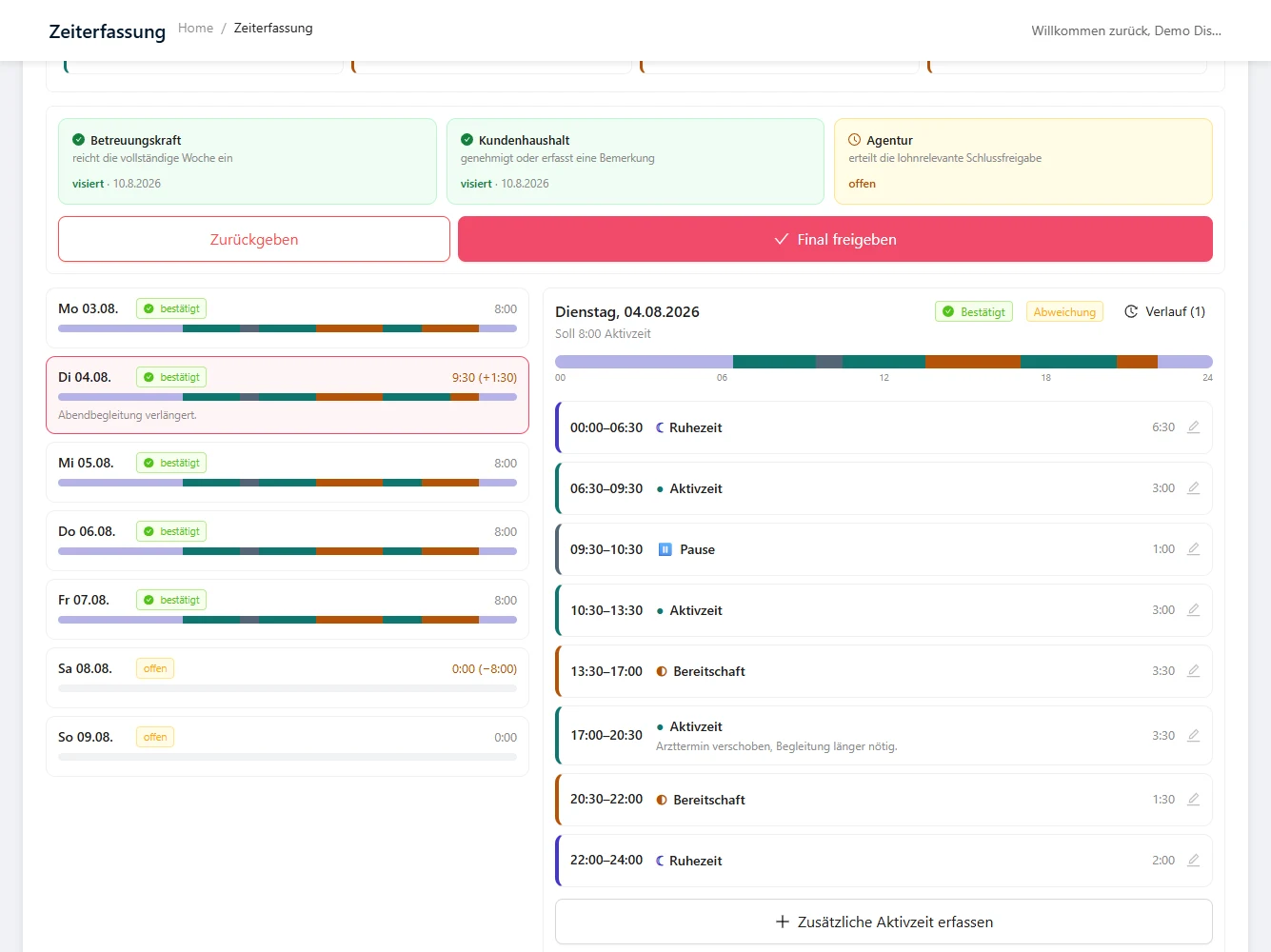
If something deviates, they tap the block concerned, change the start and end time and leave a comment. The planned value stays visible, struck through, and the deviation is calculated. Only deviations need attention.

Day view in the GAV module: weekly overview on the left, on the right the time blocks of one day with a changed active-time block and a comment
Standby duty

The app knows when standby turns into working time

The caregiver records actual call-outs during standby separately, with start, end, reason and travel time. If there are zero to two call-outs, the block remains standby and is counted at the stored rate. From the third call-out in the same block, the whole block switches to active time, the daily and weekly totals are recalculated and the check runs again automatically. This is exactly where spreadsheet solutions fail, because nobody recalculates retroactively.

Standby block · Night

Zero to two call-outs

Standby

The block remains standby and is counted at the stored rate.

From the third call-out

Active time

The whole block switches to active time, daily and weekly totals are recalculated, and the check runs again automatically.

Diagram. Each call-out is recorded with start, end, reason and travel time.

Approval

Caregiver, household, agency. In that order, every week

The caregiver submits the complete week; after that, changes are only possible via a correction request. The client household approves, rejects or adds a comment. After final approval by your agency, the week is locked. Later corrections run exclusively as a new version with a reason, change history and renewed approval. Missing or overdue sign-offs automatically trigger a reminder to the responsible role.

Caregiver

Submits the complete week. After that, only a correction request.

Client household

Approves, rejects or adds a comment. Via a one-time link, without login.

Agency

Final approval. The week is locked and versioned.

The household does not need access.

It receives a one-time link by email, sees the weekly totals and the days that deviate, and clicks approve, reject or comment. No login, no additional licence seat.

The household is only asked when necessary.

If the week runs to standard and within the set tolerance, it goes straight to your back office. Whether a household signs off at all, you configure per client.

Payroll

One export per caregiver and pay period

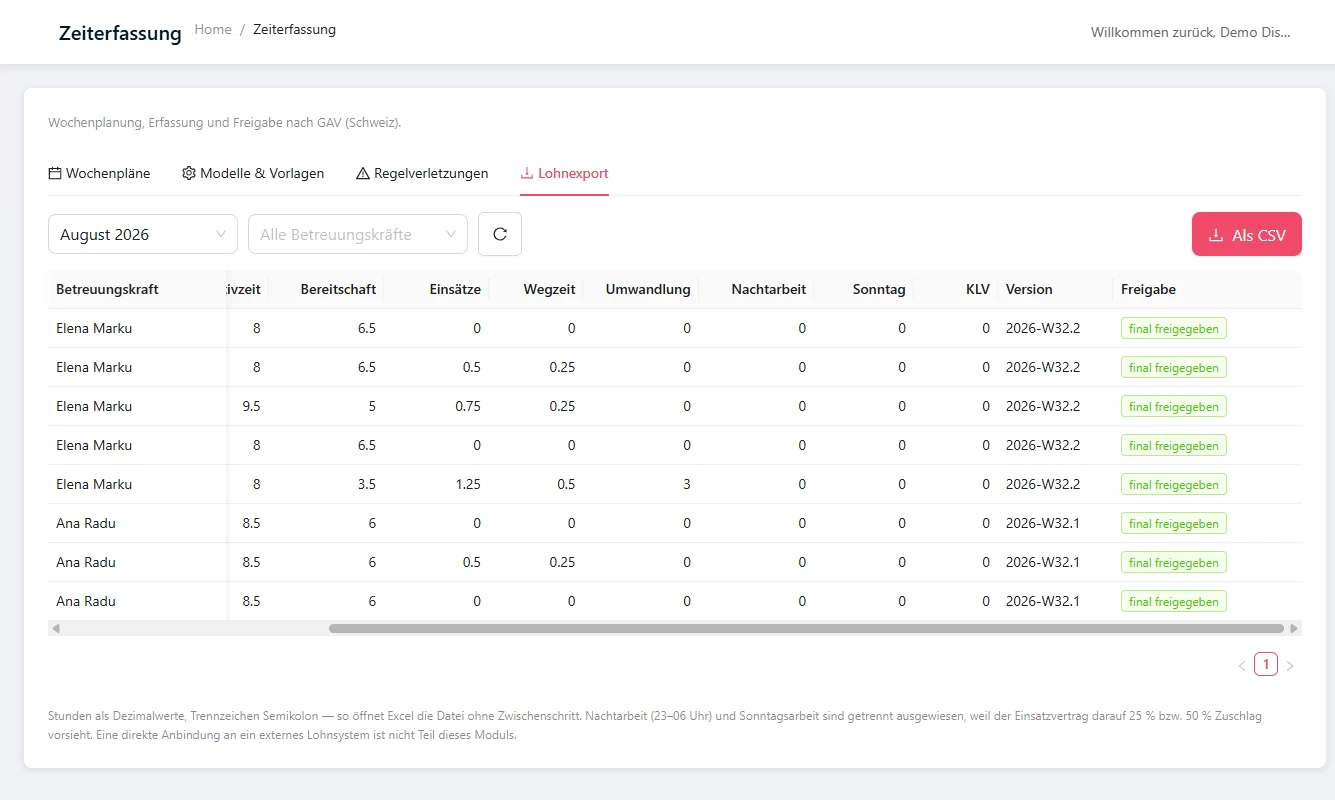
The export contains the daily totals for active time and standby, the actual call-outs during standby, the travel time and the standby blocks converted into active time.

Each row references the finally approved weekly version and its approval status, because without this reference the export is no use as a payroll record. Format: Excel and CSV.

Payroll export in the GAV module: table with active time, standby, call-outs, travel time, conversion, night and Sunday work, weekly version and approval status

What else is included

GAV weekly planning is one module among several. Everything else runs in the same software.

Data migration

Your data comes with you. Within 48 hours, free of charge.

The most common reason for putting off a switch is the legacy data: years of client households, caregivers, contracts and documents. That is exactly the part we take on - you just supply the export.

Import in 48 hours · €0 · also as a custom import

The data import function is a fixed part of HerzensManagement - not an extra service but built in: ready-made import routes exist for the care and placement solutions common in the German-speaking region. Tell us your current system - if there is no ready-made route, we develop the import specifically for you, free of charge and with no surcharge on your plan.

1

Export from your current system

  • Your current industry solution Import already built in
  • Excel and CSV lists
  • Your document folders

No export possible? Then sample files or access are enough for us - we build the route.

2

We handle the import

  • We map your fields and check them
  • Test run in your environment
  • Your approval before go-live

Effort for your team: one coordination meeting and the approval.

3

Everything is in HerzensManagement

  • Client households, caregivers, contracts
  • Weekly plans and sign-offs
  • Documents and invoice history

Structured, searchable and usable in day-to-day work from day one.

You keep control of your legacy data: we only import what you approve, and we record the migration in writing.

Technical details of the import

Formats and interfaces

  • CSV and Excel (.csv, .xlsx)
  • XML and JSON
  • Database exports and dumps
  • REST interface / API
  • Document archives as PDF, images or ZIP

What we check

  • Field mapping, including your own custom fields
  • Duplicates and missing mandatory details
  • Date, number and currency formats
  • Character set and umlauts
  • Links between client household, caregiver and contract

Process and timeframe

  • Data handover via a protected upload
  • Test import before anything goes live
  • Your acceptance, then go-live
  • Custom import usually within 48 hours of receiving the data

You do not need to know how to do any of this yourself. Tell us your current system; we will clarify the rest in the coordination meeting.

The import is already there

HerzensManagement comes with its own import function - including ready-made routes for common industry solutions. No add-on module, no setup fee, no migration flat fee, not even for larger volumes of data.

Custom import included

For systems without a suitable standard route - including in-house Swiss developments and Excel landscapes - we develop the import specifically for you, usually within 48 hours of receiving your data.

No parallel operation needed

Your history is complete in the system from the start. You do not have to keep two solutions open for months or retype legacy data.

Have your data migration checked, no obligation

Prices you do not have to ask for.

From €7 per client per month, full package €11. No setup fee, no minimum size.

Frequently asked questions

Does the software cover the special provisions for live-in care?
Yes. Weekly and four-week planning, standby duty, rest periods, breaks and the Visierung chain of caregiver, client household and agency are built into the system. Eleven checks run at day, week and four-week level before a plan is approved.
Can we set up our own product models?
Yes. Models and hour values are your agency's master data, not hard-coded. You create a new model or adjust values without waiting for a new software release. Each model can hold at least four weekly templates that can be saved, copied and versioned.
Does the client household need access to the software?
No. It receives a one-time link by email with the weekly totals and the days that deviate, and can approve, reject or add a comment. No login, no additional licence seat. Whether a household signs off at all, and from what deviation onwards, you set per client.
What happens if the caregiver was called out several times during standby?
They record each call-out with start, end, reason and travel time. Up to two call-outs, the block remains standby. From the third call-out, the entire block is treated as active time, the totals are recalculated and the check runs again automatically.
Can we get the data out for the payroll run?
Yes, as an export per caregiver and pay period in Excel and CSV, with daily totals and an unambiguous reference to the approved weekly version. There is no direct interface to an external payroll or accounting system. You get the file, not the integration.
What happens after a week has been approved?
The week is locked. Every later correction creates a new version with a reason and change history and goes through approval again. User, timestamp, old and new value are logged.
How long does the switch take?
We handle onboarding and data migration, with no setup fee. Your team is up and running in 7 days.

30 minutes, no risk, you see the real system.

Bring your trickiest cases. And if it turns out not to be a fit: 6-month money-back guarantee from go-live.